
Smart Launcher 6 ‧ Home Screen
Smart Launcher TeamPersonalization
4.531.10K Reviews
- Version
- 6.6 build 025
- Installs
- 50.00M
- Age Rating
- Everyone
Screenshots
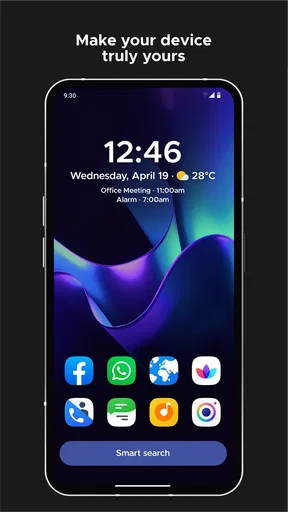
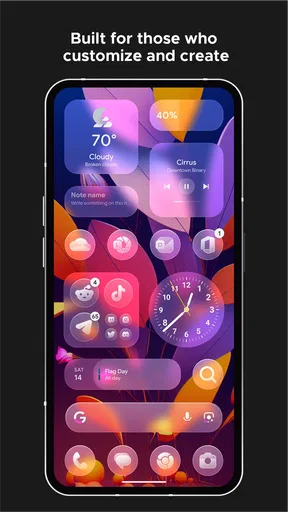
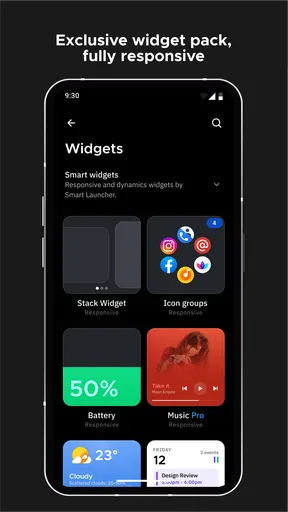
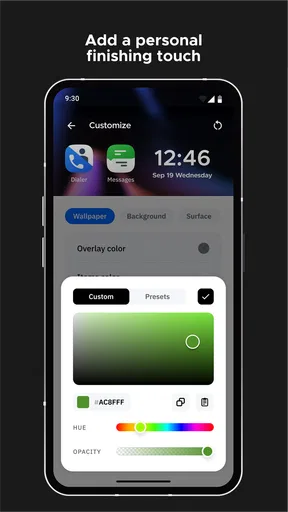
Our Review of Smart Launcher 6 ‧ Home Screen
 Analysis by Appyee
I judge a launcher less by how dramatic its first screen looks than by whether it makes ordinary phone use feel easier after the novelty wears off. Smart Launcher 6 is a personalization app from Smart Launcher Team that puts organization and a more tailored home screen at the center. Its approach suits people who want to shape their daily layout rather than simply swap a wallpaper, though the extra choices are most useful when you settle on a few settings and use them consistently.
Start with a repeatable home-screen routine
The easiest way to get a feel for the launcher is to treat the home screen as a small set of daily destinations, not a place to display every app you own. I would begin with the apps I reach for most, then use the app categories to find less frequent ones without filling the first screen with icons. That keeps the main view practical while still leaving the broader collection accessible.
A realistic example is checking the phone before leaving home: glance at a calendar widget, open a navigation app, then find a transit or messaging app in its category. The benefit is not that every task becomes instant; it is that the layout can reduce the small decisions involved in locating things. If your habits change, moving a widget or adjusting an icon arrangement is a more useful response than rebuilding the entire screen.
Settings worth checking before you settle in
Smart Launcher 6 offers enough visual choices that I would make the basic layout readable before chasing a theme. Icon size and grid arrangement affect how quickly you can scan the screen, while color and icon shape are more about the look you want. A dense grid may suit someone who opens many apps from the home screen, but a more open layout can be easier to read and leaves room for widgets.
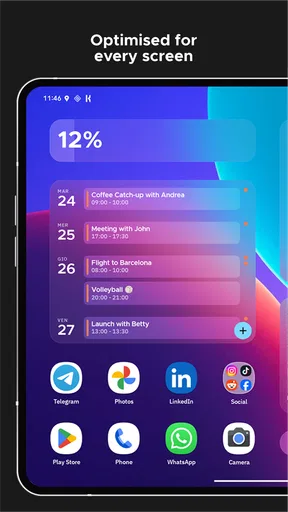
Widgets are worth placing with a purpose. A calendar or weather widget can make the first screen useful at a glance, but several large widgets can crowd out the shortcuts they are meant to support. I prefer starting with one widget I actually consult, using the phone normally for a few days, and then deciding whether another deserves the space. That simple trial keeps customization connected to real habits rather than turning it into a project that never feels finished.
Build speed through habits, not endless tweaking
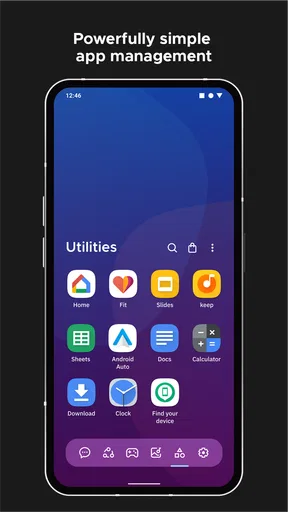
Automatic app categorization is one of the more practical parts of the experience: instead of relying on a long scroll or remembering where every icon went, I can look in the relevant group. It is particularly handy for apps used occasionally, such as a service app or a tool I need only for a specific errand. For frequent tasks, a direct home-screen shortcut is still the better choice; categories help with discovery, but they are not a substitute for putting your daily essentials within easy reach.
There is a useful trade-off here. The launcher can make a mixed collection feel more orderly, but any organizational system works best when you learn where it puts things and keep your layout stable. If you move icons and widgets every day, muscle memory never has much chance to develop. I would make a few deliberate changes, then let the arrangement earn its place through regular use.
Where personalization has limits
A different launcher changes the way the home screen behaves, so it may take a little adjustment if you are accustomed to your phone’s default layout. People who want the manufacturer’s exact look and navigation may be happier leaving the standard launcher in place. Likewise, someone who rarely uses widgets or changes appearance may not get enough day-to-day value from a broad set of customization options to justify learning a new layout.
It is also worth keeping expectations sensible around performance and privacy. My experience with a launcher should not be treated as a promise that every phone will respond identically, and app locking is a convenience rather than a reason to assume every privacy concern is solved. If you use it, check the available lock settings and make sure the approach suits the way you protect your device. More generally, the best setup is not the one with the most options enabled; it is the one you can understand and maintain.
Who should try it, and who may prefer another route
I would recommend Smart Launcher 6 to someone who wants a cleaner way to reach a varied app collection, likes shaping icon and widget placement, and is willing to spend a little time making the layout their own. Compared with sticking to a phone’s default launcher, it gives more room to adjust the appearance and organize apps, while the default option is usually the simpler choice for anyone who wants familiar behavior with no setup. Other personalization tools may be a better fit if their particular look or workflow matters more to you than this launcher’s category-based organization.
The app is free to install, with in-app purchases ranging from $0.49 to $27.99 per item. It is rated for Everyone and has a 4.6 average from around 661,000 ratings, alongside over 10 million installs. Those figures suggest it has a broad audience, but they do not tell you whether its layout will suit your habits; trying a restrained setup is a better test than copying someone else’s elaborate screen.
It first appeared on July 11, 2012, and the current release is version 6.6 build 002 patch 1, for devices running Android 7.0 or later. The long-running focus on home-screen organization makes sense for a launcher, but the practical question is still whether you want to manage your screen more actively. If you prefer a ready-made, unchanged interface, the standard launcher is less work. If you like choosing how your main screen looks and where things live, the extra control can be worthwhile.
Ever felt like your phone's home screen is just a chaotic mess of apps and widgets? Well, I was in the same boat until I stumbled upon Smart Launcher 6. This nifty little app is like having your own personal assistant for organizing and customizing your home screen. If you're anything like me and love having everything neat and tidy, you're going to want to stick around for this review.
What Makes Smart Launcher 6 Stand Out?
First off, let's talk about the design. Smart Launcher 6 is all about simplicity and efficiency. The app automatically categorizes your apps into neat folders, making it super easy to find what you're looking for without scrolling endlessly through a sea of icons. It's like having a little Marie Kondo living in your phone.
Customization Galore
One of the highlights of this launcher is its customization options. You can change the entire look of your home screen with just a few taps. Whether you're into sleek minimalism or vibrant colors, there are plenty of themes to match your vibe. Plus, you can adjust icon shapes, sizes, and even the grid layout. It's like a playground for those who love to personalize their tech.
And let's not forget the widgets. With Smart Launcher 6, you can add and rearrange widgets with ease, making your home screen not only attractive but also functional. Need quick access to your calendar or the weather? No problem, just pin it right where you need it.
Performance and Usability
Now, I know what you're thinking – with all these features, won't it slow down my phone? Surprisingly, not at all. This launcher is incredibly lightweight and doesn't drain your battery. It's optimized for performance, ensuring everything runs smoothly even on older devices. I noticed my phone was just as snappy as ever, if not more so, after the switch.
Navigating through the launcher is intuitive. Everything is where you'd expect it to be, and the learning curve is practically non-existent. Even if you're not the most tech-savvy person, you'll find it easy to use. Trust me, if I can do it, anyone can.
Security Features
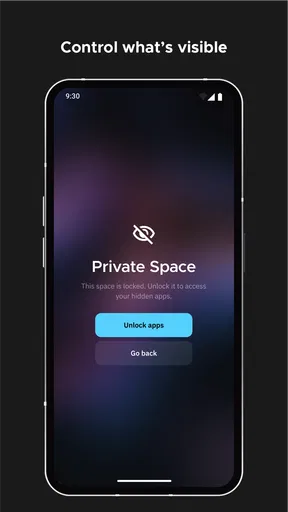
In today's digital age, privacy is a big deal, and Smart Launcher 6 gets it. The app comes with built-in security features like app locking, so you can keep your private apps away from prying eyes. Just set a PIN or use your fingerprint, and you're good to go. It’s a nice touch that gives you peace of mind.
Who Will Love Smart Launcher 6?
If you're someone who loves having a well-organized space, this app is a dream come true. It's perfect for those who want to streamline their smartphone experience without sacrificing style. On the other hand, if you prefer the default look and feel of your phone, you might find it a bit of an adjustment. But hey, trying new things can be fun!
Overall, Smart Launcher 6 is an excellent choice for anyone looking to revamp their home screen. It's packed with features yet remains user-friendly, making it a top pick in the world of launchers. So, if you're ready to give your phone a fresh new look and feel, why not give it a try?
And there you have it – my take on Smart Launcher 6. Hope this helps you decide if it’s the right fit for you. Happy customizing!
Privacy and Permissions
See what permissions an app requests and how it handles your data.
- Calendar
- read calendar events plus confidential information, add or modify calendar events and send email to guests without owners' knowledge
- Contacts
- read your contacts
- Location
- approximate location (network-based), precise location (GPS and network-based)
- Phone
- directly call phone numbers
- Photos/Media/Files
- read the contents of your USB storage, modify or delete the contents of your USB storage
- Storage
- read the contents of your USB storage, modify or delete the contents of your USB storage
- Other
- view network connections, expand/collapse status bar, full network access, run at startup, set wallpaper, control vibration, prevent device from sleeping, modify system settings
Verdict
Strengths of Smart Launcher 6 ‧ Home Screen
- Highly customizable interface.
- Efficient resource management.
- Quick access to most-used apps.
- Intuitive gesture controls.
- Regular updates enhance features.
Limitations of Smart Launcher 6 ‧ Home Screen
- Limited free version features.
- Occasional lag on older devices.
- Some themes require payment.
- Ads in the free version.
- Limited widget customization.
Other Releases by Smart Launcher Team
View All
Icon Pack Studio
Personalization4.1
Similar Picks in This Category
View All
Microsoft SwiftKey AI Keyboard
SwiftKey4.3

Wallpapers
Google LLC4.1

Zedge™ Wallpapers & Ringtones
Zedge4.7

Yandex Browser with Alice AI
Direct Cursus Computer Systems Trading LLC4.3

Ringtone Maker:create ringtone
Big Bang Inc.4.7

Fonts Keyboard
Fonts Keyboard3.9
Frequently Asked Questions
What customization options does Smart Launcher 6 offer?
Smart Launcher 6 is known for its extensive customization options. Users can personalize their home screen with various themes, icon packs, and widgets. The app allows for unique layouts and offers features like adaptive icons and adjustable grid sizes, ensuring a tailored user experience that suits individual preferences.
Is Smart Launcher 6 compatible with all Android devices?
Smart Launcher 6 is compatible with most Android devices running version 5.0 Lollipop and above. However, some features might be limited depending on the device's specifications and Android version. It's advisable to check the app requirements on the Google Play Store before downloading to ensure optimal performance.
How does Smart Launcher 6 impact device performance and battery life?
Smart Launcher 6 is designed to be lightweight and efficient, minimizing its impact on device performance and battery life. It uses minimal resources and runs smoothly on both low-end and high-end devices. Users have reported improved speed and responsiveness compared to other launchers.
Does Smart Launcher 6 include any premium features?
Yes, Smart Launcher 6 offers a premium version that unlocks additional features such as advanced gesture controls, more extensive customization options, and an ad-free experience. Users can choose between a one-time purchase or a subscription model to access these premium features.
What security features does Smart Launcher 6 provide?
Smart Launcher 6 includes several security features to protect user privacy. It offers app locking with PIN, pattern, or fingerprint, ensuring sensitive apps remain secure. Additionally, the app has a hidden apps feature, allowing users to conceal apps they wish to keep private and out of view.
